
Home/Catalogue/Kensington/K33972US
 Drag to turn · 14 views
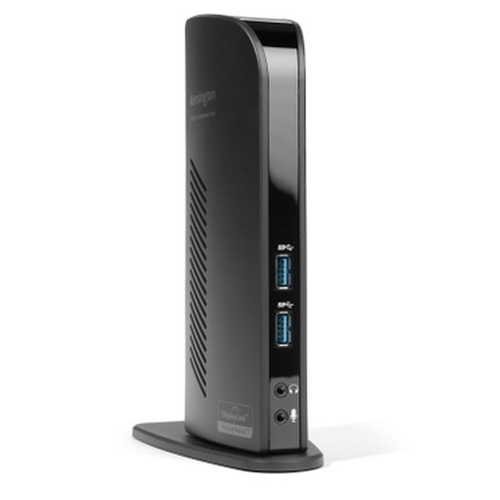
SD3500v Wired USB 3.2 Gen 1 (3.1 Gen 1) Type-B Black
- Best For: USB 3.0 Laptops, Ultrabooks & Windows Tablets, and Monitors that support up to 2K
- Connection Technology: USB 3.0 (DisplayLink)
- Compatibility: Windows 7 or above, macOS 10.14
- of Monitors Supported: 2
- Video Ports: 1 x HDMI v1.2 and 1 x DVI-I (DVI-to-VGA and DVI-to-HDMI supported with included adapters)
- Maximum Resolution Supported: Single Monitor: 1920 x 1200 @ 60Hz and Dual Monitors: 2048 x 1152 @ 60Hz
- Reply within 1 business day
- Volume & business pricing
- Shipping across Canada & US
Overview
Ultra-thin laptops and 2-in-1 convertibles like the Microsoft Surface Pro offer great mobile productivity and sleek good looks. But that also means they usually come up short on connectivity ports. As a result, you’re constantly plugging and unplugging peripherals. That’s where the SD3500v USB 3.0 Universal Docking Station comes in. It turns one USB port into six so you have access to all your peripherals, including keyboard, mouse, printer and external hard drive. And with dual HD video output, you can add two external monitors to boost productivity. The dock’s two USB 3.0 ports support super-speed data transfer of up to 5 Gbps.
Connect two additional screens with 1 DVI Out & 1 HDMI Out
Expand your workspace by adding additional monitors. Connect your DVI monitor to the DVI port or use the included DVI>VGA adapter to connect your VGA monitor. If you've got an HDMI monitor, you can connect directly into the HDMI out port. You can also connect a second HDMI monitor to the DVI port using the included DVI>HDMI adapter. You can run both the DVI and HDMI ports simultaneously.
Extend Mode
Extend your workspace by making it bigger. Extend mode allows you to share your whole desktop across multiple screens. Ideal for improved productivity by working with, and viewing, multiple applications at the same time.
Clone Mode
Allows you to replicate the same content on your second display as you do on your master display.
2 Front USB 3.0 Ports
Two fast and powerful USB 3.0 ports are positioned on the front of the dock for when you want to charge a phone or tablet, or transfer data from another device. Headphone and microphone input ports are also conveniently within reach when they’re needed.
4 Rear USB 2.0 Ports
Connect all your peripherals with 4 USB ports. These ports are strategically located on the back of the docking station to help keep your printer, keyboard and mice cables or wireless dongles hidden from view.
Display Settings Software
Our intuitive display management console sits on your applications bar and allows you to easily switch between display modes, change the master monitor or adjust alignment and position of your screens. Our corporate install support provides for mass installation via the Microsoft® server.
Add more screens
You can hook up even more monitors using a multi-display adapter, which is available separately. These connect into one of the six USB ports and can be used with DVI or VGA monitors.
Free Kensington DockWorks™ Software
Enables the best connection, performance, and security from your Kensington dock.
Specifications
Ports & interfaces
- Connectivity technology
- Wired
- Host interface
- USB 3.2 Gen 1 (3.1 Gen 1) Type-B
- USB 2.0 ports quantity
- 4
- USB 3.2 Gen 1 (3.1 Gen 1) Type-A ports quantity
- 2
- USB Power Delivery (USB PD)
- No
- HDMI ports quantity
- 1
- HDMI version
- 1.2
- VGA (D-Sub) ports quantity
- 1
- DVI-I ports quantity
- 1
- Microphone in
- Yes
- Headphone outputs
- 1
Network
- Ethernet LAN
- Yes
- Ethernet LAN (RJ-45) ports
- 1
- Ethernet LAN data rates
- 100,10,1000 Mbit/s
Performance
- Card reader integrated
- No
- Data transfer rate
- 5 Gbit/s
- HD type
- 2K Ultra HD
- Maximum digital resolution
- 1920 x 1200 pixels
- Number of displays supported
- 2
- Maximum refresh rate
- 60 Hz
- Cable lock slot type
- Kensington
- Product colour
- Black
Software
- Windows operating systems supported
- Yes
- Mac operating systems supported
- Yes
Other features
- Compatible operating systems
- Windows 7 or above; macOS 10.14 or above
More in Docks & Replicators
 KensingtonSD5600T Thunderbolt 3 and USB-C Dual 4K Hybrid Docking Station - 100W
 K34009NA KensingtonSD4850P USB-C 10Gbps Dual Video Driverless Docking Station - 100W PD -
K34115NA KensingtonOVERVIEW Ideal for professionals requiring a plug-and-play docking sol
K32810NA KensingtonSD4790-MAC EQ USB-C Triple 4K Docking Station for MacBook The SD4790-M
K33621NA-MAC KensingtonMany IT professionals face the challenge of managing different docks f
K33622NA KensingtonOn the go or in the office, the UH1510P EQ USB-C 5Gbps Triple Video Dr
K34040WW KensingtonEnhance your productivity with the SD5000T5 EQ Thunderbolt 5 Triple 4K
K35201NA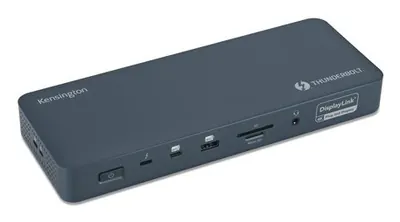 KensingtonA typical Thunderbolt 4 dock only supports a single display for MacBoo
K35232NA